

Shopify landing pages are essentially blank templates that—when creatively filled out—deliver a message in a manner that wouldn’t otherwise be possible on social media, blog content, and email, among others.
This gives landing pages excellent convincing and converting potential.
So, how do you get started with making a good landing page?
Things To Consider Before Creating landing page with Shopify

Source: Shopify
Landing pages are not deployed in isolation.
They are integrated with the overarching marketing strategy to meet business goals.
Take, for example, the landing page for Shopify's $1/month offer, as shown above. The goal of this is to get more users signed up for the Shopify platform.
When creating a landing page with Shopify, here are some things to consider before you begin:
Marketing Goals

Source: Shopify
The first thing to consider before creating a landing page with Shopify (or any other marketing collateral, for that matter) would be your marketing goals.
Landing pages work effectively for short-term marketing goals.
For example,
- 100 free webinar sign-ups for the next month
- 20% more purchases for a select product for the next quarter
- 10% more membership sign-ups for the next quarter
It’s best to first determine your long-term business and marketing goals.
For example, doubled brand affinity in the next five years.
Then, break those long-term goals into short-term marketing goals—ideally, ones that creating a landing page with Shopify can help achieve.
For example, 100 membership sign-ups for the next month.
Once you’ve decided on your short-term goals, determine which CTAs work best to achieve those goals.
The 100 membership sign-up goal can benefit from a “Sign-Up” CTA.
Digital Marketing Channels

Source: Blendjet
Digital marketing channels, such as social media, blog post links, YouTube content, and email, among many others, will be driving traffic to your landing pages.
It’s crucial to audit and account which marketing channels will be part of the marketing campaigns.
That way, your team can ensure that the Shopify landing page’s messaging remains consistent with the marketing channels’ messaging.
Messaging and Crucial CTAs
Home pages typically have multiple CTAs and deliver various brand messages to site visitors.
Landing pages, on the other hand, work best with just one CTA and a clear, distinct message.
So, before creating a Shopify landing page, determine first what your CTA and messaging will be.
This will allow your Shopify landing page to be more persuasive and convincing—nudging people toward one clear, distinct action. This is better than presenting multiple ideas that can split visitors’ attention to different brand messages.
Always tie the landing page’s CTA back to your marketing goals.
Target Audience

Source: Narrato
Consider the target audience for the Shopify landing page before creating it.
Note: Your landing page audience may not necessarily be the same as your general target audience.
Identifying the demographics, geographics, and psychographics of your landing page audience will help you craft a page that resonates optimally with them.
This is mostly in terms of copy. But also consider the layout and landing page style (e.g., colors, typography, etc.).
How to Create a Shopify Landing Page?
Learning how to create a Shopify landing page isn’t any different from creating a Shopify home page, albeit with a few tweaks.
Unlike home pages, when you create a Shopify landing page, it is typically built as a standalone web page, rarely linking to the rest of the website. They're mainly meant to elaborate on a message and drive people to a single CTA.
Here’s how you can create the best Shopify landing page.
Step#1: Choose an Ideal Theme
You can do plenty with free themes, such as Dawn.
These are enticing options, considering they don’t cost anything.
However, paid themes can offer more features, which can result in more engagement and conversions.

Take the Shine theme, for example.
The Shine theme has 28 sections to choose from, some of them being:
- Icons with text. This section helps highlight listed features and qualities.
- Logo list. This section helps highlight reputable partners and clients.
- A Countdown timer block. This section invokes urgency and FOMO.
- Text hotspot. Visitors can hover over “hotspots” on an image and receive a corresponding copy, letting them know more about the image (typically, an image of a product).
- Running content. This content moves along the length of a device’s screen, making a landing page appear more dynamic.
- Side-by-side Images Slider. This section is tailor-made for before and after content, allowing users to see incremental differences between a “before” image and an “after” image.
The theme sections and blocks mentioned above are unique to Shine.
These are features that merchants may be missing out on if they insist on using only free themes.
Nonetheless, when building a landing page, it’s crucial to have these engaging and converting elements in your arsenal to better nudge visitors to your desired CTA buttons.
So it’s highly recommended that you explore paid themes.
Go to the Shopify theme store, click on any paid theme, and click Try Theme.
This will allow you to explore a paid theme’s features and customization options before you pay for it.
Note that you’ll only need to pay for a theme once you publish a page containing that theme.
Step#2 Create and Duplicate, Landing Page Templates
Landing pages aren’t a one-off thing.
As your online business goes about its lifetime, it will face changing markets, trends, and, hence, shifting marketing goals.
This means that a marketing strategy should be adaptable and flexible. You may need to have multiple CTAs ready, depending on how your marketing goals change over time.
So, it’s crucial to have a system for creating landing pages as speedily and efficiently as possible.
One approach to that is by creating and duplicating landing page templates.
Create a Shopify Landing Page Template
Go to the Shopify Theme Editor.

Navigate to Homepage - Pages - Create Template.

Name the template something easy to remember. For example, “Landing Page.”
Then in the “Based on” field, select Default Page.
Then click Create Template.
This will create a new template that you may immediately populate with sections and blocks to your liking.
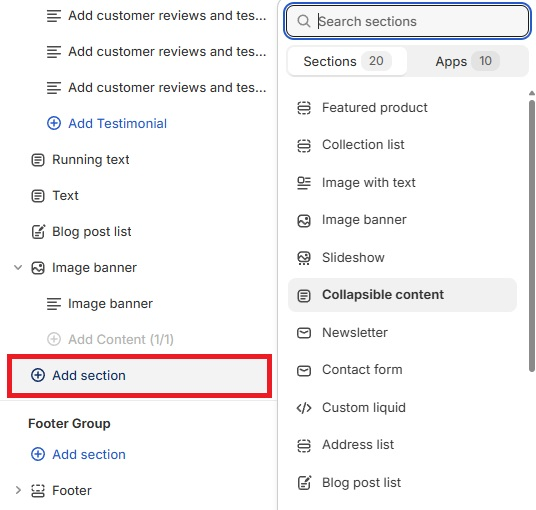
On the left panel, click on + Add Section to add a section to the page. The layout and function of this section will depend on the section you’ve added.

For example, Shine’s “Side-by-side Images Slider” section allows you to place two images overlaid on top of each other. The site visitor may drag a line to reveal a portion or the entirety of each image.
Common use case scenarios for this section are Before and After content.
Depending on the sections you’ve added, you may also place blocks underneath them.

Click + Add Block (it may be called something else, depending on the section)underneath a section when available.
This will add a component to the section, whether it’s an image, a video, more text, a button, an additional slideshow slide, etc.

Keep adding sections and blocks until you’re satisfied with your page’s layout.
Duplicating the Shopify Landing Page Template
Once you’ve made a Shopify landing page template that you feel works, you would want to duplicate it each time you make a landing page—although with some changes for each new landing page iteration.
In the Shopify Theme Editor, go to Homepage - Pages - Create Template.
Give the new template a name.

Then, in the “Based on” field, select the Shopify landing page template you created earlier.
This will make a new template containing the exact layout of the template it’s based on. You may make changes to this new template without changing the original one.
Duplicating landing pages and editing them allows your staff to scale landing page production since it eliminates the need to create landing pages from scratch every time.
This allows for increased landing page production and improved A/B testing.
Step#3 Add Images, Text, and Color
Once you have your landing page layouts ready, spruce them up with images, text, and some much-needed style. This will create a stunning landing page.
To get started, click on a block or section.

Depending on the block/section you’ve selected, you’ll see an option to add images and text on the right panel.

Source: Rosetta Stone
Add images and text in the areas they should go. This will fill the landing page with content, turning it from an otherwise blank document to a page with function and purpose.
Ideally, you should have the following photos:
- The hero banner.
- Product photos.
- Customer testimonials.
Once you have your photos and text in areas you see fit, you may proceed to change up your landing page’s style.

Click the gear icon on the left panel.
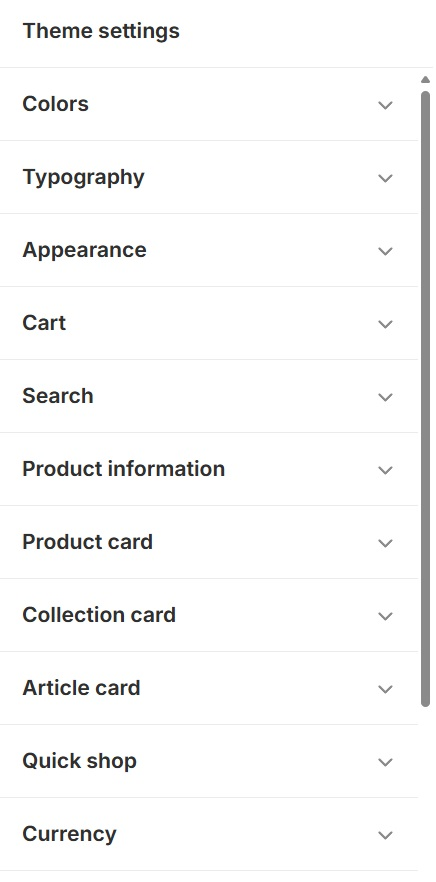
This will take you to the theme settings. It allows you to change the theme’s overall look—tweaking things such as color, typography, animations, section padding, and display logo, among others.
There’s a lot to dissect when editing the theme settings. But the most significant ones that can make the most difference are color and typography.
Make sure to explore the theme settings panel and play around until you find the look that you’re most satisfied with.

Note: Don’t edit the existing color schemes since other sections are likely to be using them. Editing the existing color schemes may make your landing page look better, but it may change the appearance of your home page as well.
Instead, create new color schemes and apply them to the landing page for a totally distinct look from the website.
Step#4 Assign the Template to a Page
Your created template isn’t live yet.
You’ll need to create a page and assign your created template to it before it can be viewed from any browser.
Note: You may only assign templates to pages if the desired template’s theme is published. So, if you’ve created a template using a certain theme, make sure you bought that theme before assigning it to a page.

To create a page, go to Online Store - Pages from the Shopify admin panel.
Click on Add Page.

Give the page a name in the Title field.
Leave the content field blank since the template will already contain the copy you need.
Underneath Theme template, click the dropdown and select the theme you created earlier. This will assign the page to the template.

Click on Edit Website SEO. This will bring up a search engine listing preview.
Edit the page title, description, URL, and handle as you see fit.
Make sure these are aligned with your landing page’s desired message since these will be visible on the browser address bar and when visitors chance upon the page via search engines.
Take note of the page’s URL. Remember it or paste it somewhere.
Click Save.
Step#5 Publish and Measure Results
Go to the Analytics section of the Google Admin panel.

Take note of the Top landing pages by sessions metric. This value displays how many visitors land on your store via the pages you’ve created.
The higher a landing page’s “Top landing pages by sessions” metric, the more visitors that page is reeling into your store.
Other ways to measure landing page performance include:
- Google Analytics. GA can analyze a landing page and fetch visitor data such as devices, geographics, etc.
- Meta Pixel. This allows marketers to track basic visitor activity, such as product views. But more advanced users may use “Custom Events” to track custom visitor activity.
- Heatmap Apps. These can determine where users have clicked, where they hover their mouse, and how far they’ve scrolled through the page.
This data is crucial when iterating future landing pages.
What’s the Best Shopify Landing Page Theme?
The best Shopify landing page theme will depend on your CTA and marketing goals.
But the three themes below will be excellent for just about anything you do.
Shine

We’ve mentioned earlier its list of nearly 30 useful sections that you can place on your landing page (refer to “Step#1 Choose an Ideal Theme”).
These features help create a credible and dynamic landing page that can effectively persuade site visitors to click the CTA buttons.
Blum

Blum provides a streamlined look that’s accentuated with loud and prominent visual elements, making it an excellent choice for creating the best Shopify landing page.
This helps landing page creators call attention to promos, limited-time offers, and value propositions, among others.
One of Blum’s sections is a countdown banner, giving the best Shopify landing page a prominent countdown that can induce urgency among site visitors.
Some sections have a “Prominent badge,” placing a striking icon on top of the webpage—usually yelling out a feature or quality about the item it’s describing. (e.g., ALL NEW, LOCALLY SOURCED, etc.)
Dawn
The Dawn theme may not have the same flexibility and functionality as the previously mentioned themes, but it’s an excellent starting point for newer online merchants.
Dawn has full Shopify support—receiving updates and being compatible with Shopify’s latest features.
Merchants who wish to explore landing page marketing can dive in with Dawn.
Frequently Asked Questions
Does Shopify offer landing pages?
Yes, Shopify allows you to create custom landing pages using the "Pages" section in your admin, or by using third-party apps and page builders that provide more advanced design options and functionalities.
What is the difference between a landing page and a product page on Shopify?
A landing page on Shopify is designed to capture visitor attention and drive specific actions, like signing up for a newsletter or promoting a special offer. A product page, on the other hand, is focused on showcasing a specific product, providing detailed information, and encouraging purchases.
Can you have multiple landing pages on Shopify?
Yes, you can create multiple landing pages on Shopify. This can be done by creating separate pages under the "Pages" section in your Shopify admin, or by using apps that allow you to build and manage multiple landing pages for different campaigns.
What is the benefit of a landing page in Shopify?
The benefit of a landing page in Shopify is that it allows you to focus on a single objective, such as generating leads, promoting a sale, or launching a new product. Landing pages are tailored to specific campaigns and help improve conversion rates by minimizing distractions.
Why is a landing page better than a website?
A landing page is often better than a full website when you want to drive specific actions, such as collecting leads or promoting a particular product. Unlike a website, which offers multiple navigation options, a landing page keeps visitors focused on a single call to action, leading to higher conversion rates.
Conclusion
A high-converting landing page is a successful landing page.
If you want your Shopify landing page to convert, it has to first entice, attract, and maintain visitors on the page. A proper landing page design is key if you want to convert visitors, so make sure to add relevant media.
A proper, customizable theme can help you create better landing pages than if you were to rely solely on free themes.